
Trade Finder
Find a swap with a friend or another of your accounts, then let Pocket Station run it.
Trade Finder compares one of your accounts with your other active accounts and with friends who share their cards (Privacy), then suggests swaps. Pocket Station runs the trade you confirm on both accounts.
Set up a search
In the bar under the page header:
- Choose account picks the account whose collection you want to improve.
- Target copies sets the goal: 1 copy completes missing cards, and 2 copies builds playsets.
- Mutual or Alt fill sets the strategy.
Mutual helps both sides: you give a card you hold above target that the friend is short of, and get one they hold above target that you're short of.
Alt fill puts your account first. It brings in a card you're short of from another of your accounts or a sharing friend, even their last copy, and sends back a spare. To use only one of your own accounts, pick it in the Friend filter.
Pick a suggestion
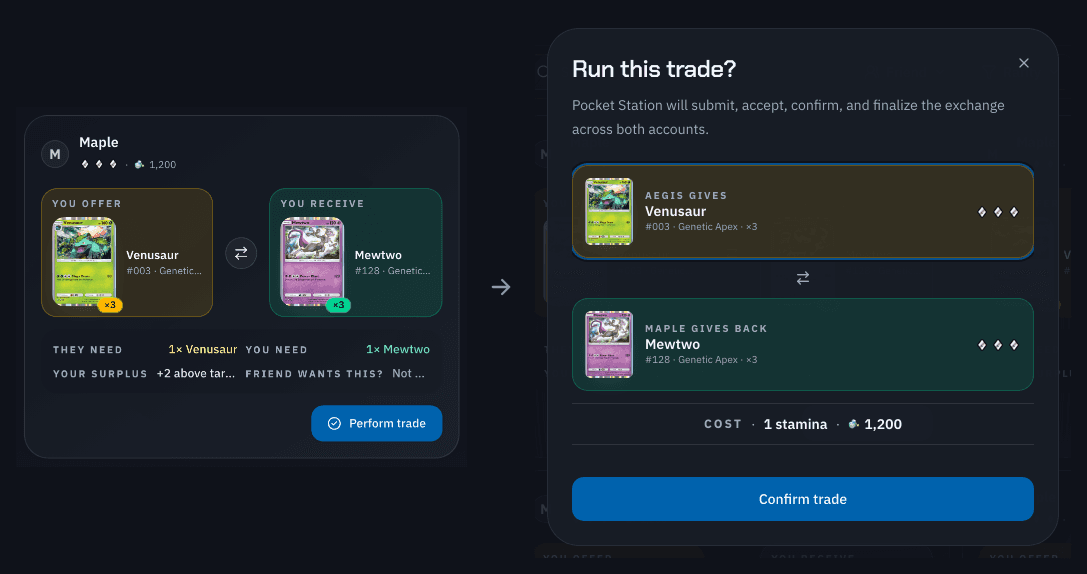
Each suggestion puts You offer beside You receive, and You need and Your surplus show how much it helps you. Narrow the list with Friend, Rarity, and Expansion, or sort by Biggest gap closed or Lowest dust cost.
Submit the trade
Select Perform trade on a ready suggestion.
In the Run this trade? dialog, check the card each account gives, then select Confirm trade.
To follow or cancel the trade, see Automatic trades. Your plan's daily limits are on the Pricing page.